How To Install an Equalizer on Windows 10 - BEST EQ
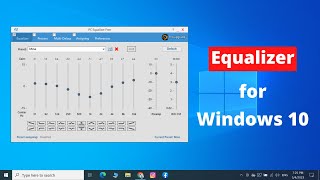 How to install and set up a software equalizer on Windows 10. Greatly enhance the sound of your speakers. Make your speakers or headphones sound like they should cost a lot more money
Links:
Install First:
https://sourceforge.net/projects/equalizerapo/?source=typ_redirect
Reboot
Install Second:
https://sourceforge.net/projects/pc-equalizer/?source=typ_redirect
How to install and set up a software equalizer on Windows 10. Greatly enhance the sound of your speakers. Make your speakers or headphones sound like they should cost a lot more money
Links:
Install First:
https://sourceforge.net/projects/equalizerapo/?source=typ_redirect
Reboot
Install Second:
https://sourceforge.net/projects/pc-equalizer/?source=typ_redirectДата: 2019-02-26 TJZ Tech Show
Похожие видео

Комментарии и отзывы: 20
1. SimpleSencilla •
I thank you so much for this video, now I've been one of those couch potatoes who have taken the easy way and installed a purchased version a while back... I started with SRS Audio Essentials (before they retired it) and once that project was shelved I went with another fairly "easy" setup called Graphic Equalizer Studio (back in 2014)..... well, I've paid upgrades yearly for this for a couple of years, but I wont anymore due to the fact I reported a few bugs in the program back when I first purchased it and one in particular that wasn't much of an issue initially just kept getting overlooked in every upgrade... and the 2017 version (latest) still suffers from it.. it's the color coded display not displaying the correct colors for mid-range frequencies. In other words, the side bars display two colors instead of the three it's supposed to. Like I said, this wasn't much of a problem at first, but I DID report it and it kept getting ignored, and since I see no significant improvemente.... there is NOT that much visual improvement in each updgrade version I purchased, except from 2015 to 2016 where the sliding buttons were given a "Y2K look" rather than the old obsolete 90s look. I literally have all the purchased versions from 2014 to 2016. And upgrades are not cheap, not a chance. I've tried the Spectrum Analyzer Pro Lab by the same programmer Frank Dunkel, and it displays the correct colors and has none of the bugs (that I can tell) but there is NO way I am spending 150 in a program that, the programmer is known to ignore bug reports. Anyway, ALL IN ALL, I really want a similar alternative. Any, even if it's free, I just want something that looks similar, and that works. I should mention, the preset Eq settings are the reason why I stuck with GES, but the "eye candy" is awesome to look at too, it's a great replacement to some old visualizers. Anyone has suggestions please? Let me know :)
I thank you so much for this video, now I've been one of those couch potatoes who have taken the easy way and installed a purchased version a while back... I started with SRS Audio Essentials (before they retired it) and once that project was shelved I went with another fairly "easy" setup called Graphic Equalizer Studio (back in 2014)..... well, I've paid upgrades yearly for this for a couple of years, but I wont anymore due to the fact I reported a few bugs in the program back when I first purchased it and one in particular that wasn't much of an issue initially just kept getting overlooked in every upgrade... and the 2017 version (latest) still suffers from it.. it's the color coded display not displaying the correct colors for mid-range frequencies. In other words, the side bars display two colors instead of the three it's supposed to. Like I said, this wasn't much of a problem at first, but I DID report it and it kept getting ignored, and since I see no significant improvemente.... there is NOT that much visual improvement in each updgrade version I purchased, except from 2015 to 2016 where the sliding buttons were given a "Y2K look" rather than the old obsolete 90s look. I literally have all the purchased versions from 2014 to 2016. And upgrades are not cheap, not a chance. I've tried the Spectrum Analyzer Pro Lab by the same programmer Frank Dunkel, and it displays the correct colors and has none of the bugs (that I can tell) but there is NO way I am spending 150 in a program that, the programmer is known to ignore bug reports. Anyway, ALL IN ALL, I really want a similar alternative. Any, even if it's free, I just want something that looks similar, and that works. I should mention, the preset Eq settings are the reason why I stuck with GES, but the "eye candy" is awesome to look at too, it's a great replacement to some old visualizers. Anyone has suggestions please? Let me know :)
2. C. •
I came back to your video to give you a 'thumbs up' and a 'thank you' For whatever reason Windows 10 does not come with an equalizer(and this is a fairly new pc that came with W10)It would seem like a no brainer to have one built in(but i guess not)Anyway this is one of those rare instances when one of those "helpful" videos was actually 'helpful' (:
Greatly enhanced, indeed are the new sounds i'm getting out of my speakers. woo hoo A few songs i used to dial in a better sound;
Ozzy - Bark at the Moon, Shot in the Dark
Dokken - Alone Again
The guitars in these songs are great for testing(and setting) speakers. Before the equalizer was installed i had to turn the volume way up to hear the mids and trebles and the bass was booming(out of control)Now i can have the volume at a lower(reasonable) volume and the mids and highs(like voices) are coming through so clearly.(works great on 'non-music' videos as well)
Again, woo hoo
I came back to your video to give you a 'thumbs up' and a 'thank you' For whatever reason Windows 10 does not come with an equalizer(and this is a fairly new pc that came with W10)It would seem like a no brainer to have one built in(but i guess not)Anyway this is one of those rare instances when one of those "helpful" videos was actually 'helpful' (:
Greatly enhanced, indeed are the new sounds i'm getting out of my speakers. woo hoo A few songs i used to dial in a better sound;
Ozzy - Bark at the Moon, Shot in the Dark
Dokken - Alone Again
The guitars in these songs are great for testing(and setting) speakers. Before the equalizer was installed i had to turn the volume way up to hear the mids and trebles and the bass was booming(out of control)Now i can have the volume at a lower(reasonable) volume and the mids and highs(like voices) are coming through so clearly.(works great on 'non-music' videos as well)
Again, woo hoo
3. Benjamin •
Hi,
I tested the programm and I like it. So I decided to merge both tools togehter.
Finally I made a "portable" Version of it. This means you just have to copy a folder to your harddrive (or just use it from USB-Stick) and use PCEqualizer.exe to start it.
The first time you start it it will use Configurator.exe so that you chose your audiochannels + restart. And then it works on the fly.
No installation is needed. For me this works much better. And the best thing is all the Equalizer-Profiles are always pre-configurated with me.
On every device I put the software on (without a real installation needed).
If interessted I can share it.
Hi,
I tested the programm and I like it. So I decided to merge both tools togehter.
Finally I made a "portable" Version of it. This means you just have to copy a folder to your harddrive (or just use it from USB-Stick) and use PCEqualizer.exe to start it.
The first time you start it it will use Configurator.exe so that you chose your audiochannels + restart. And then it works on the fly.
No installation is needed. For me this works much better. And the best thing is all the Equalizer-Profiles are always pre-configurated with me.
On every device I put the software on (without a real installation needed).
If interessted I can share it.
4. PitbullTerror88 •
There is something called 'realtek hd audio manager' that would be allready present in win10... just make sure you enabled the 'show pictogram in systemtray' for quick easy acces.
A handy tip for those who not know; if you listening to music on youtube disable the Loudness Equalisation option, and when watching regular videos on youtube enable it. (improves soundvolume )
ofcourse stacking EQ's would make shit even louder.. xD
There is something called 'realtek hd audio manager' that would be allready present in win10... just make sure you enabled the 'show pictogram in systemtray' for quick easy acces.
A handy tip for those who not know; if you listening to music on youtube disable the Loudness Equalisation option, and when watching regular videos on youtube enable it. (improves soundvolume )
ofcourse stacking EQ's would make shit even louder.. xD
5. Willie •
Just got my first DAC/AMP from Massdrop. I also got some included speakers in the drop that weren't cheap and I was not happy with the sound and ultimately with my purchase. They sound great listening to music but all the youtubers I watched sounded muddy. Using this EQ helped me validate my purchase and it all sounds great now so thank you very much.
Just got my first DAC/AMP from Massdrop. I also got some included speakers in the drop that weren't cheap and I was not happy with the sound and ultimately with my purchase. They sound great listening to music but all the youtubers I watched sounded muddy. Using this EQ helped me validate my purchase and it all sounds great now so thank you very much.
6. BassRiderX •
I thought I had great sound before with system settings running my DT 770s through m-audio preamp. I thought wrong. LEVEL UP
The sound I'm getting presented to my ears is astounding I can hear ALL of the little nuances in my music. It's like a whole new level of listening. So much of my life has been amiss...until now.
I thought I had great sound before with system settings running my DT 770s through m-audio preamp. I thought wrong. LEVEL UP
The sound I'm getting presented to my ears is astounding I can hear ALL of the little nuances in my music. It's like a whole new level of listening. So much of my life has been amiss...until now.
7. Alok •
Thanks buddy, you did awesome. I had sound issue with VLC player while watching movies in Windows 10 because equalizers doesn't work there. Therefore, I was unable get clear sound of the movie, specially for dialogues. Now I enjoy the movie with good sound quality. Many thanks
Thanks buddy, you did awesome. I had sound issue with VLC player while watching movies in Windows 10 because equalizers doesn't work there. Therefore, I was unable get clear sound of the movie, specially for dialogues. Now I enjoy the movie with good sound quality. Many thanks
8. Groovemaster2k •
Awesome Thx for this One thing though is that if you REALLY want good, flat sound use a pink noise generator to tune rather than music. Then go through each frequency one by one until they all sound the same volume to your ears. Music will sound like butter after that
Awesome Thx for this One thing though is that if you REALLY want good, flat sound use a pink noise generator to tune rather than music. Then go through each frequency one by one until they all sound the same volume to your ears. Music will sound like butter after that
9. Mloc •
I got both programs installed and I can use PC Equalizer at first try. When I close the program for later use, I click on the shortcut and it pops up for a split second then its gone??
Ive uninstalled it and itll work for one time, then it starts all over again????
I got both programs installed and I can use PC Equalizer at first try. When I close the program for later use, I click on the shortcut and it pops up for a split second then its gone??
Ive uninstalled it and itll work for one time, then it starts all over again????
10. dillon •
Hello, question about a video you posted "How To Install an Equalizer on Windows 10 - BEST EQ" when i attempt to assign a preset to an application i get the message, "preset not found"...do you have any idea what could be the problem? thanks -dj
Hello, question about a video you posted "How To Install an Equalizer on Windows 10 - BEST EQ" when i attempt to assign a preset to an application i get the message, "preset not found"...do you have any idea what could be the problem? thanks -dj
11. VladGoro25 •
Used EPO for a whihe but recently i started having loud self-distortion or how it is called.....like, i am playing or listening music and sudenly sound distort itself and volume is increasing.....how can i fix this? win10 x64....sorry for grammar i am drunk
Used EPO for a whihe but recently i started having loud self-distortion or how it is called.....like, i am playing or listening music and sudenly sound distort itself and volume is increasing.....how can i fix this? win10 x64....sorry for grammar i am drunk
12. Dan •
The EQ you recommended only works some of the time - I have a new Window 10 computer. I uninstalled both EQ's and now no audio is coming from my PC and music files now have an error code 0x887c003a and wont play. Do you know why and what is teh fix?
The EQ you recommended only works some of the time - I have a new Window 10 computer. I uninstalled both EQ's and now no audio is coming from my PC and music files now have an error code 0x887c003a and wont play. Do you know why and what is teh fix?
13. John •
IT DOESN'T WORK: Try this - If you manipulate the "switch" on the far right ("BW Oct") you may hear the audio change. This needs to be adjusted to between 2 and 4 and then the other changes to the frequencies can be heard.
IT DOESN'T WORK: Try this - If you manipulate the "switch" on the far right ("BW Oct") you may hear the audio change. This needs to be adjusted to between 2 and 4 and then the other changes to the frequencies can be heard.
14. Trace •
So I installed this (works awesomely by the way) But I notice every time my PC updates, the equalizer disables and only uninstalling and reinstalling it seems to help. Anyway to fix this so I don't have to do that every time?
So I installed this (works awesomely by the way) But I notice every time my PC updates, the equalizer disables and only uninstalling and reinstalling it seems to help. Anyway to fix this so I don't have to do that every time?
15. BLITZ •
I get a this error please help...
Error: attempt to concatenate global 'bwoc_n' (a nil value) Stack Traceback: 1: [EqualizerPg -> On Show] Line: 952 in main chunk
I get a this error please help...
Error: attempt to concatenate global 'bwoc_n' (a nil value) Stack Traceback: 1: [EqualizerPg -> On Show] Line: 952 in main chunk
16. buder5 •
i want the hardware varriant for a 5.1 setup with dedicated sub volume independt of the volume :S but can't figure out what kind of equalizer i need and how many channel :S
i want the hardware varriant for a 5.1 setup with dedicated sub volume independt of the volume :S but can't figure out what kind of equalizer i need and how many channel :S
17. GENE •
hey TJ thank you man you really helped me out i did not have any knida EQ on my pc except the bass booster. oh and dont forget to dissable the enhancements like the bass booster
hey TJ thank you man you really helped me out i did not have any knida EQ on my pc except the bass booster. oh and dont forget to dissable the enhancements like the bass booster
18. Torm •
It does work, but it is pretty tricky to use compared to the usb audio card I have. It is hard to get what you want out of this without having different kind of problems.
It does work, but it is pretty tricky to use compared to the usb audio card I have. It is hard to get what you want out of this without having different kind of problems.
19. 6sɥǝɹǝ6ʞɥɐu6 •
wtf, every fucking time i download the first link, install it, then restart my pc, nothing changes, i have to keep re-doing the same thing over and over
wtf, every fucking time i download the first link, install it, then restart my pc, nothing changes, i have to keep re-doing the same thing over and over
20. Deano •
Actually this works well for me and my USB Turntable, Had trouble getting it to work first install but after re-install of the GUI it works very well. Thanks :-)
Actually this works well for me and my USB Turntable, Had trouble getting it to work first install but after re-install of the GUI it works very well. Thanks :-)
Добавить отзыв, комментарий
Недавно смотрели


Онлайн Мини-Игры
• Машины • Головоломки • Шарики • Стрелялки • Бродилки • Стратегии • Симуляторы • Настольные • Карты • Другие
Новые Комментарии
Ка4ка.ру - все для твоей Хороший был чат .. ...
HDDTurbo
После установки сломал винду пришлось долго переустанавливат ...
Вотспик модпак - Сборка м
Пишет мод на 1.44 а скакчивается на 1.43 измените пожалуйста ...
MICRO-CAP 12.2.0.5
На 10й вроде был русик. Работал на нём. Хорошая прога для ан ...
Process Explorer
Утилита передает информацию о нагрузке на центральный процессор, опера ...
Вконтакте
